Advertisement
Click to download now, finish the installation quickly, and directly unlock the all-round experience
Advertisement
Screenshots
Click to download now, finish the installation quickly, and directly unlock the all-round experience
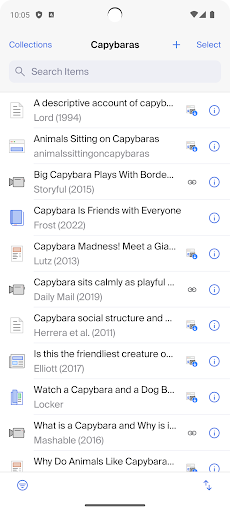
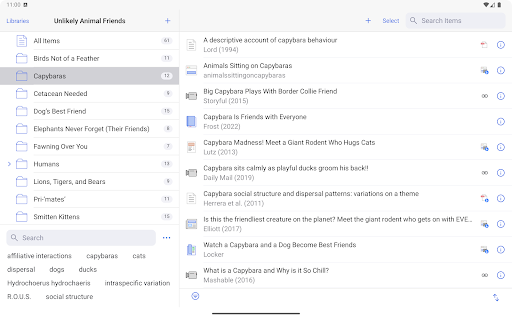
Zotero helps students, researchers, and other readers collect sources and keep their details organized. You can save items by sharing a link from a browser or another app, then sort them into collections and add tags. Its 4.57 rating across 1,031 reviews and 500,000+ installs suggest a well-used option in the Productivity category; the developer is also Zotero.
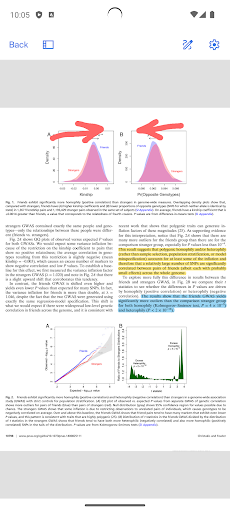
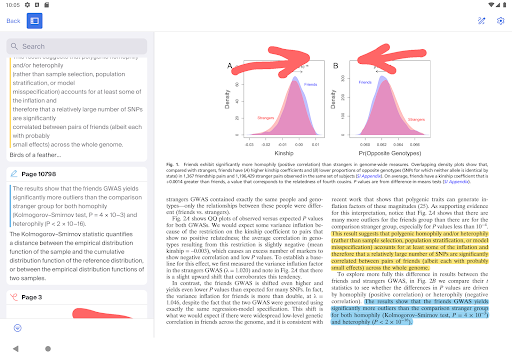
The app can retrieve bibliographic details for saved PDFs and download article PDFs when they are accessible without a login. You can also scan a physical book’s barcode to add it to your library, then view or edit its bibliographic information. For reading, Zotero supports PDF highlights, notes, images, and ink annotations, keeping those marks alongside the source rather than in a separate notebook.
Zotero is most useful when research involves more than reading: it brings source capture, organization, and PDF markup into one library. Personal and group libraries can sync with Zotero’s website and desktop app, and group libraries support collaborative source collection and PDF annotation. Citation and bibliography generation is available through the web library or desktop app, with many styles supported; it is not yet an Android feature.
If you mainly need a place to read PDFs and jot down thoughts, Zotero’s collection and reference-management tools may be more than you need. Its advantage is keeping research sources and their bibliographic details together, especially across Android, the web, and desktop. Its limitation on mobile is that citation generation requires switching to the web library or desktop app. Choose it for a connected research workflow, not for citation formatting on Android alone.